

An audit trail can be the deciding factor between a valid and an invalid electronic signature document. It plays a critical role in verifying authenticity and ensuring trust in digital transactions.
How Audit Trails are Used for Electronic Signature vs. Digital Signature Documents
Electronic Signatures
-
Information in electronic form (sound, symbol, or process)
-
Attached to or associated with a document
-
Legally binding if:
-
It can be linked to a person
-
There is clear intent to sign
-
Digital Signatures
-
A specialized type of electronic signature
-
Uses encryption algorithms
-
Provides:
-
Identity verification of the signer
-
Document integrity (detects tampering)
-
To learn more, see electronic signatures vs. digital signatures.
What is an Audit Trail?
Technopedia, the IT education site, defines an audit trail in the context of information technology as “a chain of evidence in the form of hard or electronic business transactions or communications resulting from business processes, functions or programming executions.”
In other words, an audit trail is a detailed list of critical data points pertaining to the transaction that are recorded and reported. These data points help verify the validity of the transaction.
Key Components of an Audit Trail
Signority’s audit trail is organized into three sections. Select a component below to learn what it means and how it supports the validity of your signed document.
Document Package Information
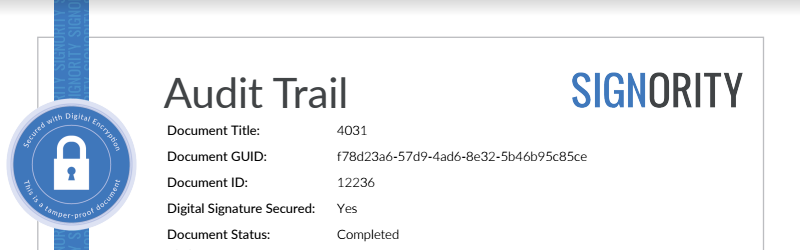
This section appears at the top of the audit trail and identifies the document package itself.
Unique Document Title
The unique document title is the file name the document creator gave the document. You can find it on the first page of Signority’s audit trail.
GUID (Globally Unique Identifier)
A GUID, or Globally Unique Identifier, is a very large number that is practically guaranteed to be unique. A GUID usually looks like this: fa06cc7a-8a32-44c2-9e4d-2192818ab076
Signority assigns a GUID to every document created. Because no two documents share the same GUID, it lets you match an audit trail to exactly one document.
Secured Seal (Digital Signature)
The “Secured with Digital Encryption” image on the audit trail indicates that Signority has digitally signed the document to ensure its integrity. If the signed document is changed, edited, or tampered with in any way, the digital signature breaks and is considered invalid.
Recipient Information
This section lists everyone who received the document and how each person interacted with it.
Name, Role, and Email Address of Each Party
The audit trail records the name, role, signing order, and email address of every party involved, for all recipient types:
-
Signer: A user who is required to sign the document. A signer can be a primary signer, a witness, or an in-person signer.
-
Viewer: A user with view-only access.
Signer Status
The signer status shows the latest action taken by each signer. Depending on that action, the status can be “Waiting to Open”, “Viewed”, “In Progress”, “Finalized”, or “Rejected”.
User Authentication
User authentication verifies a recipient’s identity before they can access the document.
Signority offers two additional verification methods for signers and viewers: SMS and email. When the sender turns on SMS or email authentication, Signority sends the recipient a randomly generated, one-time code. The recipient must enter this code to access the document.
The authentication method used for each recipient is shown in the “Authentication” section of the audit trail.
Signature Creation
The audit trail displays each signer’s original signature as it was created. This is one of the most critical components of the audit trail.
In Signority, as with most eSignature providers, a signer can create their signature by:
-
Drawing it with a touchpad, touchscreen, or mouse
-
Typing it with a keyboard
-
Uploading a scanned image of their signature
Document History
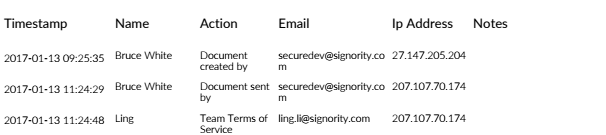
The Document History section is a chronological log of every action taken on the document, from the moment it is sent until it is finalized and beyond.
Types of Actions Recorded in the Audit Trail
The audit trail records many types of actions. Key actions in a standard signing flow include:
-
Document sent: The sender sent the document to its recipients.
-
Terms of use accepted: The signer or viewer agreed to Signority’s terms of service, which is required to use Signority’s services.
-
Authentication passed: The recipient entered the correct SMS or email verification code.
-
Document viewed: The recipient opened the document.
-
Document signed: The signer added their signature to the document.
-
Document submitted: The signer completed and submitted the document.
-
Document downloaded: Once all signers have finalized the document, every party is notified by email with a copy of the finalized document attached for safekeeping. The audit trail continues to track downloads after signing and updates in real time.
Information Recorded for Each Action
Each entry in the Document History includes the following details.
Time of Action
Each action is marked with the exact date and time it was completed.
Note: Starting October 23, 2026, timestamps show the time zone as a GMT offset instead of an abbreviation such as PST. Audit trails for documents completed before this change are not affected.
Name and Email Address of the Party
Each action lists the name and email address of the person who performed it, such as the sender who sent the document or the signer who signed it. This ties every event in the history to a specific, identifiable party.
IP Address of the Party
An IP (Internet Protocol) address is a unique identifier that a device, such as a computer, tablet, or smartphone, uses to communicate over the internet. To learn more, see IP Location.
Signority records the IP address of the device used for each action. This adds an extra layer of evidence about where and how each party interacted with the document.
Additional Notes
Some actions include extra details that give more context about what happened, for example, the authentication method a recipient used, or the reason a recipient gave for rejecting the document. If no additional information applies to an action, this field is left blank.