

As a Recipient, there may be times when you need to switch signer responsibility from yourself to another person. Maybe the sender sent the document to the wrong person, or you do not have the authority to sign the document. This can easily be remedied if you access the document and switch signer responsibility by entering the information of the new signer.
If you're the sender, and you would like to change recipients or modify their information, you can do so from your account under the documents recipients list page. For more information, see How to Update, Change, or Remove a Recipients after Sending a Document.
How to Switch Signer Responsibility
-
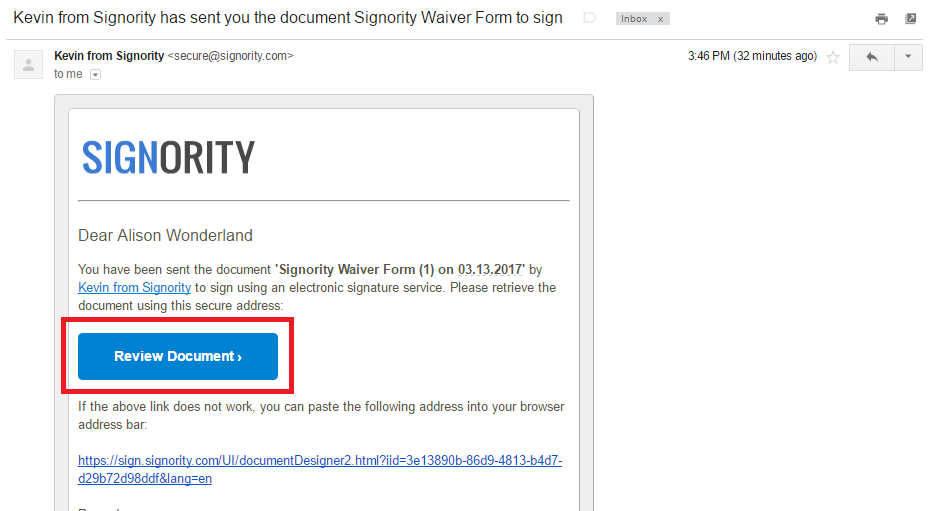
Go to your email inbox and open your invitation email.
-
Click Review Document.
-
Once on the Signority signing page, agree to the terms of use and click OK.
-
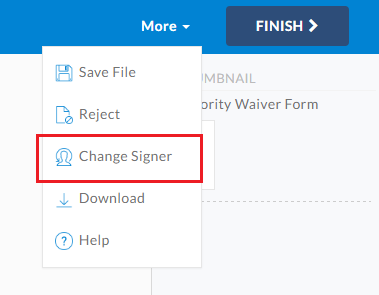
In the the top right of the header select More > Change Signer.
-
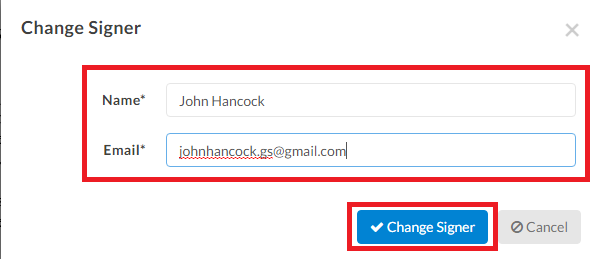
In the pop-up window, Enter the name and email of the person you would like to transfer signing to.
-
Click Change Signer.
The page will reload with the document open, but there will be no tags visible to you.
The new signer will receive an invitation email in their inbox, and your original invitation will no longer be valid. You can still click on the Review Document button and view the document itself, but you will not have signing capabilities anymore. The new signer can complete the document and they will receive the finalized document.