

LIMITED TRIAL
The Document Retention Period in Signority defines how long finalized documents are stored before they are automatically deleted. By default, this period is set to 90 days but can be changed by a team billing admin or super admin.
After the defined period has passed, documents are moved to the Purge queue, which you can find on the Documents page. They remain in the Purge queue for 14 days before permanent deletion. During this 14-day period, documents can still be downloaded or saved if needed.
Note: During the document retention period, users are still able to delete documents themselves. To prevent this, you can enable an additional setting (see below).
Set up Document Retention Period
-
From the user dashboard, navigate to the Admin Console by selecting Admin on the left sidebar menu.
-
In the Admin view, select Settings > Global Settings on the revised side menu.
-
In the Global Settings pop-up, scroll to Retention and Backup or select Retention and Backup from the tab navigation.
-
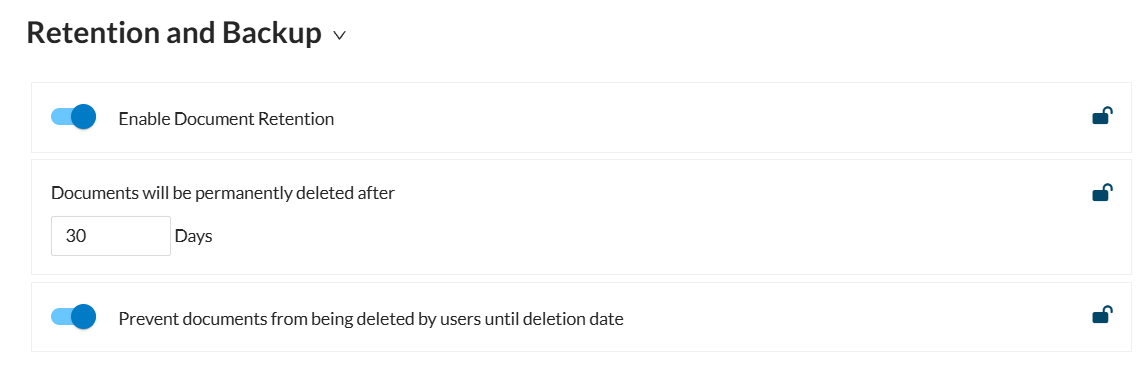
If it is not already enabled, toggle on Enable Document Retention.
-
Adjust the number of days before a document is moved to the Purge queue.
-
Click Save in the top right of the pop-up to apply these changes.
Prevent Users from Deleting Documents Early
To stop users from deleting documents before the retention period ends:
-
Ensure Document Retention is enabled
-
Locate the setting Prevent documents from being deleted by users until deletion date
-
Toggle this option ON
This ensures documents cannot be manually deleted before their retention period expires.
Managing Changes to Retention Settings
Changes to the retention period apply only to documents created after the change is saved. Documents created before the change keep the retention period that was in effect when they were created.
Increasing the number of days in the retention policy
Increasing the retention period extends retention for new documents only. Existing documents, including documents already in the Purge queue, keep their current deletion dates.
Decreasing the number of days in the retention policy
Decreasing the retention period shortens retention for new documents only. Existing documents will not be moved to the Purge queue early, and documents already in the Purge queue are not affected.
For example, suppose your retention period is 90 days and you change it to 60 days on March 1. Documents created before March 1 will still be retained for 90 days. Documents created on or after March 1 will be retained for 60 days.
Turning off the retention policy
If you turn off the retention policy for your account or team, then all documents in the Purge queue will be removed from the Purge queue, and all signed documents will be displayed and accessible as usual. All documents will continue to remain in your Signority account until explicitly deleted.