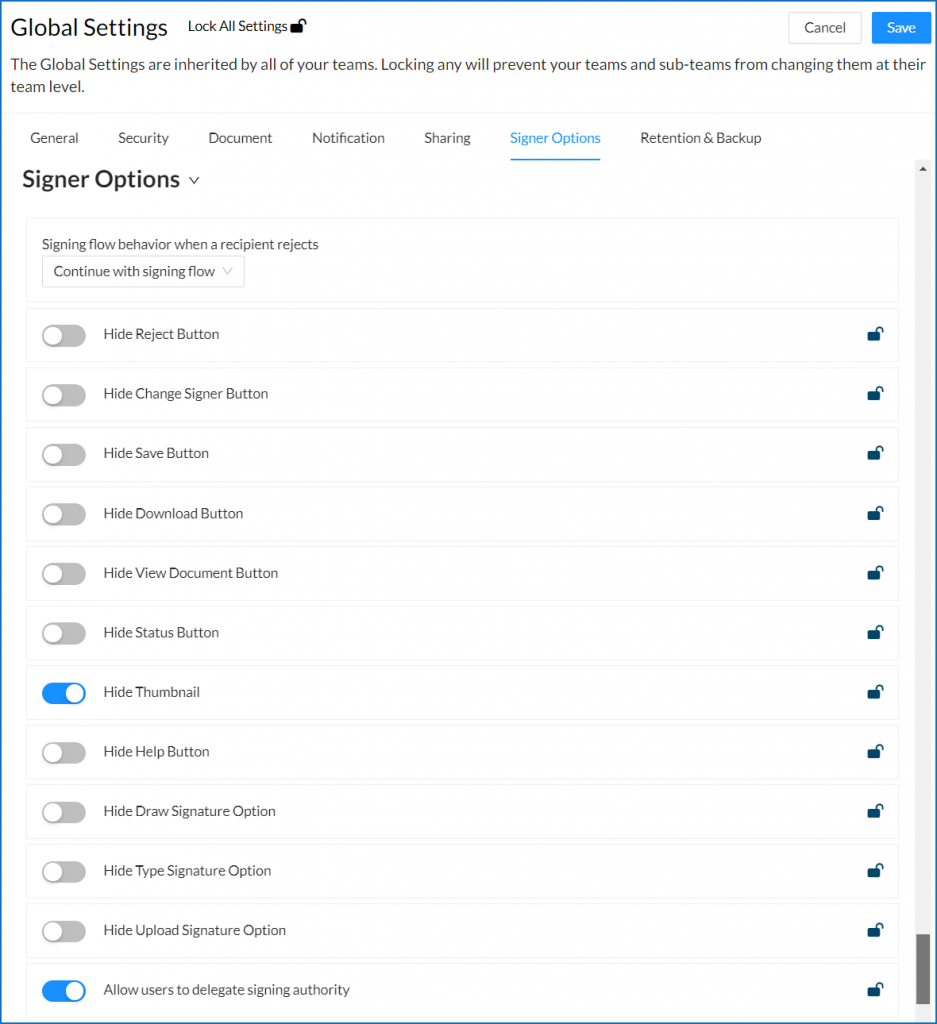
Signer Options allow an organization to determine what restrictions, if any, signers have when signing a document. They can be configured in both Global, Team, and account level, and can be set as a default or enforced (locked) for your team.
Signer Options
|
Option |
Configuration Level |
What it Restricts / Controls |
|---|---|---|
|
Signing flow behavior when a recipient rejects |
Global Only |
Defines what happens if a signer rejects a document (when the Reject button is visible) |
|
Hide Reject Button |
Global, Team, Account Profile, and Per Document |
Removes the option for a signer to reject the document. When visible, rejection triggers the workflow defined under Signing flow behavior when a recipient rejects. |
|
Hide Change Signer Button |
Global, Team, Account Profile, and Per Document |
Prevents signers from reassigning their signature tags to another person. When visible, the signer can forward the document to someone else (e.g. a spouse), and Signority will request the new signer's name and email. |
|
Hide Save Button |
Global, Team, Account Profile, and Per Document |
Prevents signers from saving their progress. The document must be completed in a single session. |
|
Hide Download Button |
Global, Team, Account Profile, and Per Document |
Prevents signers from downloading the document during or after signing. |
|
Hide View Document Button |
Global, Team, Account Profile, and Per Document |
Prevents signers from viewing the document after it has been finalized. |
|
Hide Status Button |
Global, Team, Account Profile, and Per Document |
Removes the ability to view the document's ID, GUID, name, creation date, expiry date, recipient list, history, and the signing status of other recipients. |
|
Hide Thumbnail |
Global, Team, Account Profile, and Per Document |
Removes the page thumbnail summary that shows how many pages are in each file. |
|
Hide Help Button |
Global, Team, Account Profile, and Per Document |
Removes the help button from the bottom-right corner of the signing page. |
|
Hide Draw Signature Option |
Global, Team, Account Profile, and Per Document |
Hides the Draw tab in the signature box, preventing signers from using a finger or stylus to sign. |
|
Hide Type Signature Option |
Global, Team, Account Profile, and Per Document |
Hides the Type tab in the signature box, preventing signers from typing their signature. |
|
Hide Upload Signature Option |
Global, Team, Account Profile, and Per Document |
Hides the Upload tab in the signature box, preventing signers from uploading a signature image. |
|
Allow Users to Delegate Signing Authority |
Enabled in Global/Team. Configured in Profile settings |
Allows users to designate a team member to sign on their behalf — useful when a user is unavailable due to vacation or time-sensitive situations. Learn how to delegate signing authority. |
When a slider is gray and to the left, the option is visible to the signer. When it is blue and to the right, the option is hidden from the signer.