

What is a PDF/A file?
PDF-A files are the globally accepted standard for archiving electronic documents, enabling the consistent viewing of documents in their original format across various software platforms. Standards PDF's (Portable Document Format), are a standardized electronic document format which facilitates a reliable presentation and exchange of documents. The appended 'A' stands for 'Archival,' underlining PDF/A's commitment to preserving content in its original form and prohibiting features unsuitable for long-term archiving. Incorporating all elements of a document, including content, fonts, and colour information within the file, ensures that the document retains its original appearance and can be faithfully reproduced, regardless of the device used.
Save as a PDF/A
Note: Available for enterprise plans. (Inquire with sales about enabling this feature.)
-
Navigate to Global Settings in the Admin Console
-
Under the 'Document' section, select the dropdown for 'PDF type output for finalized documents' and choose PDF/A-2b.
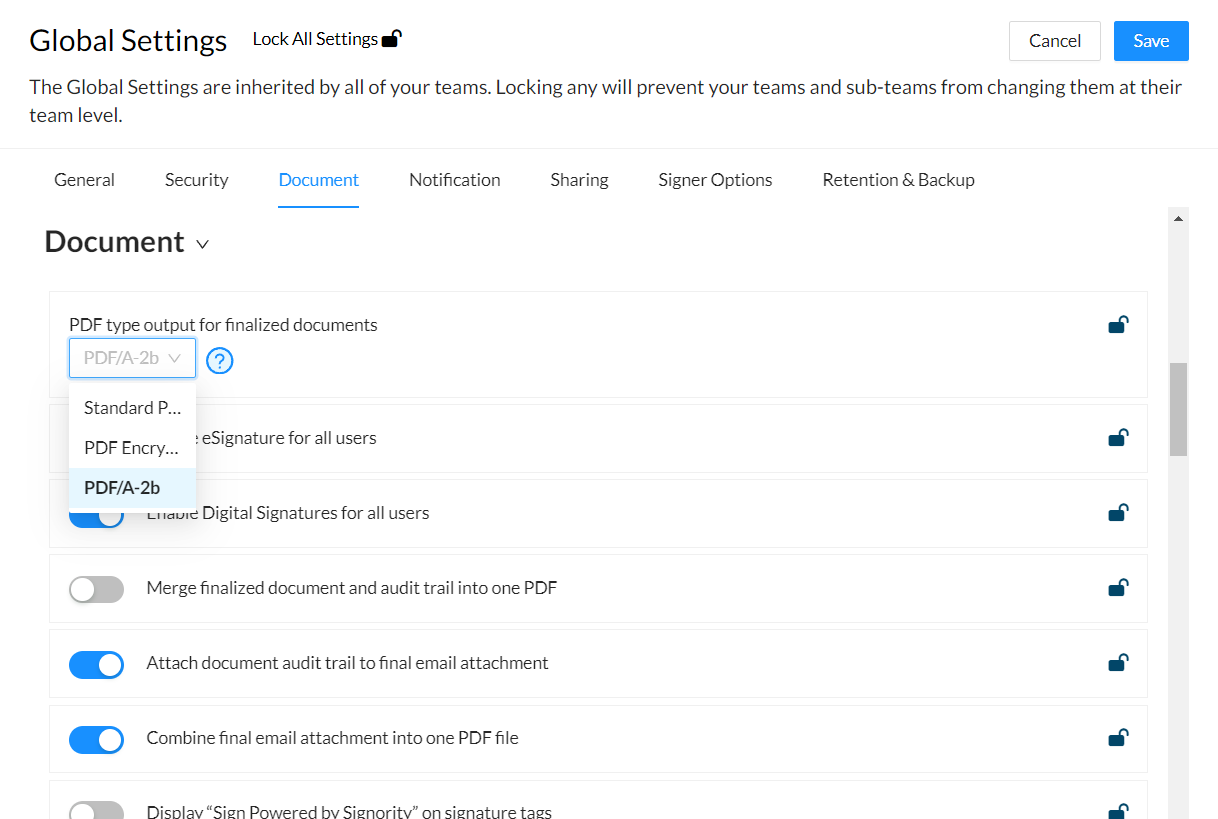
-
Click save in the top right.
Your documents will now be saved as a PDF-A once they are finalized.