

Required VS Optional Tags
In Signority, you have the option to set tags as required or optional.
Most tags are set to required by default meaning the recipient MUST complete that tag before submitting the document.
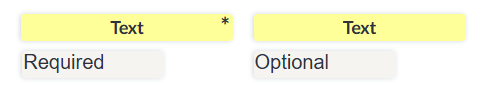
Required tags are marked with an asterisk(*) in the top right corner of each tag.
Set a Tag as Required/Optional
To change if a tag is required or optional:
-
Select the tag you wish to change the requirement setting for.
-
In the tag’s settings panel that opens to the right of the editor, check/uncheck the Required checkbox.
Tip: If you have multiple tags you need to change the requirement setting for, you can select multiple tags and edit this simultaneously.