

-
Create a document or template as usual, uploading your files and adding the recipients.
-
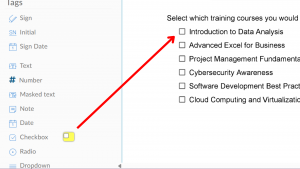
In the document editor, locate the Checkbox Tag under the Tags section on the left panel.
-
Drag and drop the text tag to your desired location on the document.
-
To add more checkboxes to the same group, click the “+” icon at the bottom of an existing checkbox.

Tip: For precise alignment, you can select the entire group and use the alignment tool on the right panel. See, Multi-Tag Editing for Faster eSign Prep.