Long forms with lots of tags can be a hassle to prepare for signing. In Signority, you can select multiple tags to edit them simultaneously. To do so:
-
Select Multiple tags by either:
-
Clicking and dragging over tags
-
Ctrl + Click (⌘Cmd + Click on Mac)
-
-
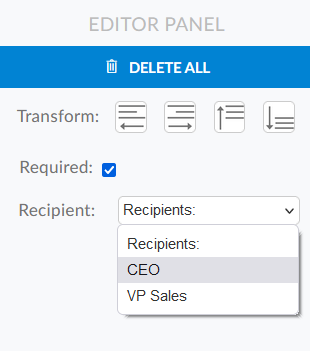
You will see an editor panel appear in the right side of the page with the following options:
-
Delete All: deletes all selected tags
-
Transform: Each button aligns selected tags either to the left, right, top, or bottom
-
Required: Set all selected tags to be required or optional
-
Recipients: Change the recipient assigned to the selected tags
-